





Why Businesses Choose Accessibility Testing Services
Digital barriers block customers, employees, and citizens from completing essential tasks. Structured testing gives teams prioritized evidence, clearer ownership, and a repeatable path from discovery through verified remediation.

Catch defects early

Protect accessibility

Automate validation

Reduce rework

Strengthen compliance

Build release confidence
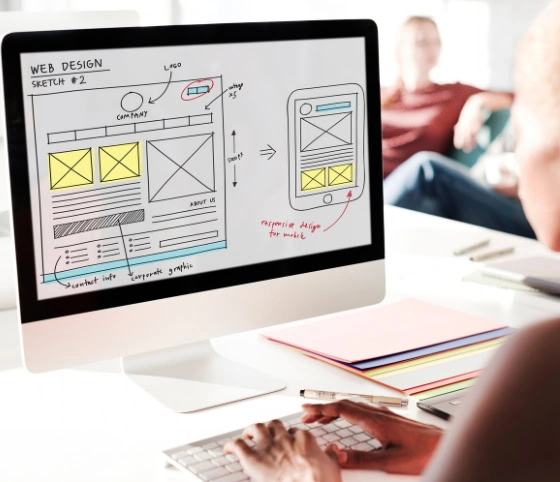
What Are Accessibility Testing Services
Accessibility testing evaluates whether people with visual, hearing, motor, speech, or cognitive disabilities can complete key digital tasks. It combines standards-based inspection, automated checks, keyboard use, assistive technology, and human judgment to identify barriers, explain user impact, and guide verified remediation.
Why teams invest in accessibility testing
- Critical journeys fail with keyboard-only or screen-reader use.
- Automated scores hide issues that require human judgment.
- Procurement teams need traceable conformance evidence.
- Frequent releases can reintroduce previously fixed barriers.
Trusted by Businesses Worldwide
Saffron Tech helps businesses improve digital accessibility through audits, gap analysis, manual and automated testing, remediation guidance, and ongoing accessibility support throughout the product lifecycle.
2.5K +
Success stories
150+
IT Professionals
30+
Industries Served
18+
Years of Experience
What the Assessment Must Define
A reliable accessibility engagement starts with a clear testing framework. Defining the target, scope, environments, evidence, and completion criteria makes the assessment measurable, actionable, and easier for teams to use during remediation and release decisions.
Target
Define the applicable WCAG version and conformance level, along with legal, procurement, and internal accessibility requirements that will guide the assessment.
Scope
Specify the websites, applications, templates, components, documents, user roles, and critical journeys that need testing, including clear exclusions.
Environment
Identify the browsers, operating systems, devices, screen readers, zoom levels, and input methods required to represent supported user environments.
Evidence
Capture reproduction steps, screenshots, code context, user impact, applicable WCAG criteria, severity, and supporting details so teams can understand and address each issue.
Exit
Establish retesting requirements, accepted exceptions, residual risks, and the stakeholder responsible for confirming whether accessibility findings are ready for release closure.
Our Accessibility Testing Services
Choose a focused audit, a product-release assessment, or ongoing accessibility quality support. Each service should use the same approved standard, severity model, evidence format, and remediation workflow.
WCAG Conformance Audit
We assess an agreed sample of pages, components, states, and journeys against applicable WCAG success criteria. The audit combines machine checks and expert evaluation. Findings explain the failed requirement, affected users, reproduction steps, severity, and recommended repair.
- Map issues to applicable WCAG criteria and evidence.
- Cover states, views, errors, authentication, and interactions.
- Separate failures, observations, and review items.
- Deliver a prioritized backlog and retest plan.
Automated Accessibility Scanning
Automated scans find deterministic code and content issues across selected pages or templates. They work best as a fast feedback layer within development. Experts review duplicates, false positives, context, and severity before findings enter the remediation backlog.
- Run repeatable scans with approved accessibility tools.
- Scan public, authenticated, component, and test environments.
- Group repeated defects by shared templates or components.
- Track recurring issues without treating tool scores as conformance.
Keyboard Accessibility Testing
Keyboard testing checks whether users can reach, understand, operate, and leave every interactive control without a mouse. Testers inspect focus order, focus visibility, traps, shortcuts, menus, dialogs, forms, errors, drag alternatives, and time-based behavior.
- Complete critical journeys without pointer input.
- Check focus order, visibility, skip links, and landmarks.
- Test dialogs, menus, forms, and custom widgets.
- Separate blocking defects from usability concerns.
Screen Reader Testing
Screen-reader testing verifies names, roles, states, relationships, announcements, reading order, and task completion. Coverage should match the supported environment matrix. Native HTML is tested first, while ARIA behavior is checked where custom controls require it.
- Test agreed screen reader and browser combinations.
- Verify headings, landmarks, links, forms, and tables.
- Check dynamic updates, route changes, and modal focus.
- Document user impact for confirmed barriers.
Mobile and Document Accessibility
We assess mobile interfaces and digital documents against the agreed platform and content requirements. Mobile work checks screen readers, gestures, orientation, scaling, labels, focus, and touch targets. Document work reviews structure, reading order, alternatives, forms, and navigation.
- Test representative iOS and Android experiences.
- Check VoiceOver or TalkBack when included.
- Review PDFs and office documents against requirements.
- Report platform-specific and shared-content defects separately.
Remediation Guidance and Retesting
A finding creates value only when a team can fix it. We translate confirmed barriers into design, content, and engineering actions. Retesting then checks the original failure, related states, and likely regression paths before the item closes.
- Provide issue-level repair guidance.
- Review shared components before individual pages.
- Retest fixes using the original method and evidence.
- Record fixed, unresolved, accepted, and other outcomes.
VPAT and Conformance Support
We support the testing evidence needed to prepare or update an Accessibility Conformance Report using the applicable VPAT edition. Product owners remain responsible for approved claims, scope, remarks, exceptions, version details, and publication decisions.
- Select the appropriate VPAT edition.
- Map evidence to applicable provisions.
- Document scope, limits, methods, and versions.
- Review drafts with product, legal, and compliance teams.
Why Choose Saffron Tech for Accessibility Testing?
Saffron Tech combines accessibility expertise with testing and product development experience to identify barriers across websites and mobile applications and help teams address them throughout the product lifecycle.
Accessibility Expertise
Knowledge of WCAG, W3C, Section 508, and ADA accessibility requirements.
Multi-Platform Testing
Test websites, mobile applications, and digital experiences.
Expert Gap Analysis
Identify accessibility barriers and prioritize areas requiring attention.
Practical Remediation
Provide actionable guidance to address identified accessibility issues.
Lifecycle Support
Support accessibility from design and development through ongoing improvements.
User-Focused Testing
Evaluate experiences with the needs of people with different disabilities in mind.
Accessibility Testing Technologies
Our accessibility teams use automated scanning tools, assistive technologies, manual testing methods, and established accessibility standards to identify barriers across websites, mobile applications, and digital products.
























AI & Data

Cloud & Platform Engineering
Engineering & Development
DevOps & Delivery
Digital Experience
Technology Consulting
Global Expertise Across Platforms
We provide accessibility testing and audit services for websites and mobile applications, covering WCAG, Section 508, W3C, and ADA-related requirements to identify gaps and support practical remediation.







Enterprise-Grade Security & Compliance

ISO 27001

HIPAA Compliant

GDPR Complian
SOC 2 Type II
Case Studies
Before this, managing our ML workflows took a lot of manual effort. The automation has made things much easier for our engineering teams.

Rohan Mehta
Head of AI EngineeringWe had data across too many systems and it was slowing down decisions. The AI platform helped us bring everything together and made day-to-day operations much smoother.”

Dr. Michael Carter
Chief Technology OfficerForecasting used to take a lot of manual work. With AI handling the analysis now, our team can focus more on strategy and customer experience.

Alex Romero
VP Engineering“The biggest difference for us is visibility. We can now see potential issues before they affect production.”

Daniel Hughes
Chief Information Officer“Routing decisions used to take hours of planning. Now the system helps us make those decisions much faster.”

Sophia Lang
Head of Data & Technology“The AI monitoring tools help us spot problems early. It’s made managing the network much easier for our team.”

Kevin Patel
Chief Technology OfficerWhat Our Clients Say
Saffron Edge is an amazing and highly recommended SEO company. They are always responsive, professional, and best of all they show RESULTS! HIGHLY RECOMMENDED!

Salvabor Ordorica
Operations Manager, Translation CompanyThe quality is exceptional. I love their work, and I appreciate our back-and-forth.

Xanare
President, Flexyn GlobalI felt that they really understood my vision and were really excited about it.

Caitlin Thorpe
Founder, Seamless TherapyFrequently Asked Questions
What do accessibility testing services include?


Does an automated accessibility scan prove compliance?
Should we test against WCAG 2.1 or WCAG 2.2?
Which pages and journeys should be tested first?
Which inputs does the testing team need?
Which assistive technologies should be covered?
How long does an accessibility audit take?
What affects accessibility testing cost?
What should an accessibility report contain?
Can accessibility testing support a VPAT?
How should AI be used in accessibility testing?
How will accessibility testing change through 2028?

Start With a Scoped Accessibility Assessment
Share the product type, target users, critical journeys, supported platforms, required standard, release date, and procurement need. The discovery output should define coverage, methods, environments, deliverables, access needs, risks, assumptions, ownership, and a cost estimate before testing begins.
Request Your Accessibility Testing PlanFind out what Saffron Tech can do for you
- Free assessment and roadmap
- Custom solution recommendations
- ROI projections for your use case
Reach out to us
Reach out to us